A service on another machine
The window and the service are two programs joined by a Unix socket (The service). That socket can be on another machine: a box that stays on while your laptop sleeps, a workstation you reach over ssh. The window connects to it the way you would — ssh — and nothing else is opened: no port, no token, no listener on the network. Collins forwards the service's socket over ssh and talks to it as if it were local.
What remote means. The service owns the sessions, their terminals, ~/.claude, git, gh and the sandboxes; the window owns what you see and type. Connected to a box, the sidebar lists the box's sessions, a tab is a terminal of the box's, the editor edits the box's files and the git page diffs the box's checkouts. Closing the window, losing the network or sleeping the laptop ends nothing: the sessions run where they were. One window shows one service at a time (This computer or a box); switching detaches every tab and reconnects.
What you need on the box
collins-service installed and on the login shell's PATH, claude logged in there, and an ssh login that works without a prompt (a key in your agent). collins-service --check on the box says what is missing.
Connecting
Connect to… in the app menu opens the Connections dialog. Its list holds the services this computer knows: This computer first, then every ssh connection you have added, with a check on the one the window shows and a trash button to remove the others. Connect, in the dialog's header, switches the window to the selected one: every open tab detaches with no question (its session keeps running where it is), the sidebar refills from the other machine's sessions, and the tabs you last had open there come back. The banner says Reconnecting to <name> while the forward is being set up. Switching back is the same gesture with This computer selected.
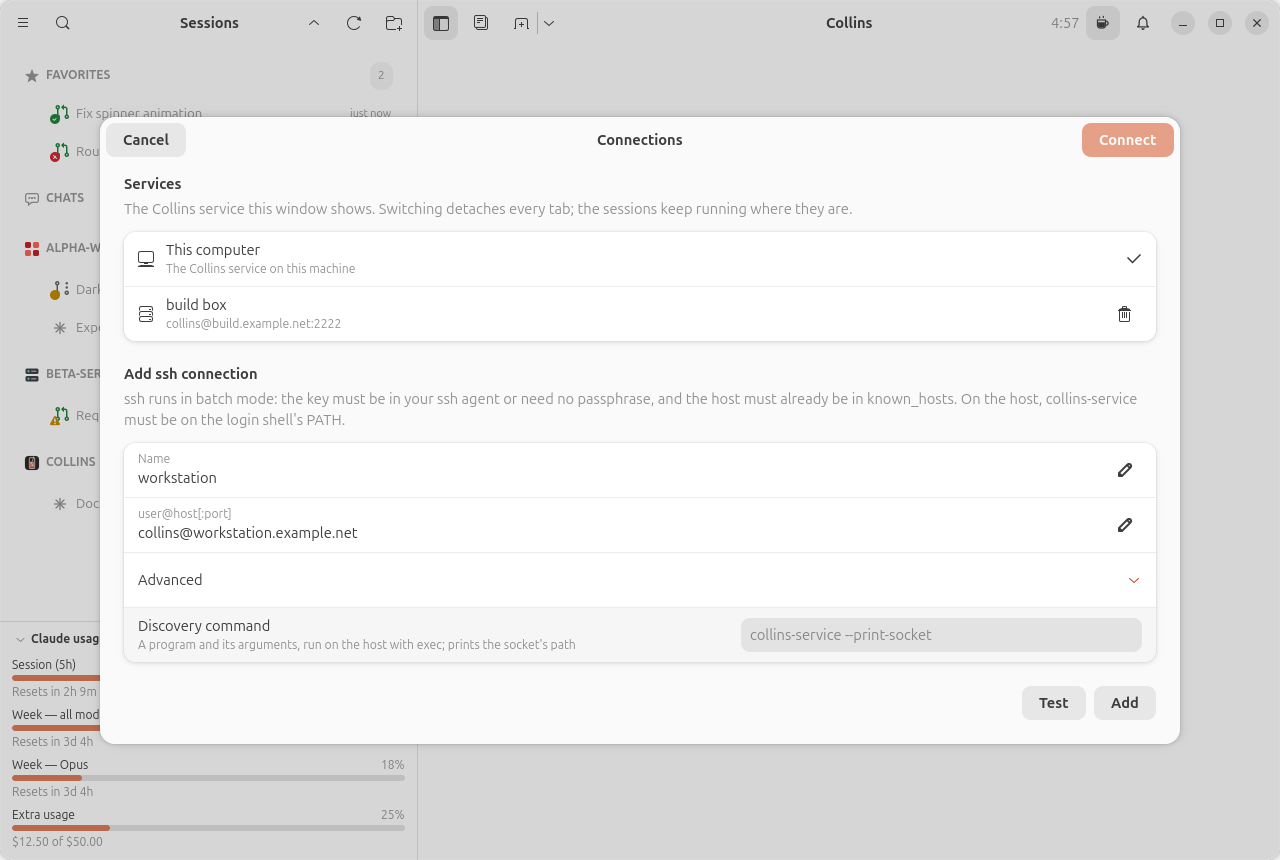
Add ssh connection takes a name and the host as user@host, user@host:port or a bare host (a name or an IPv4 address; an IPv6 literal is not taken). Test runs, in short (the full command is below),
ssh -o BatchMode=yes user@host collins-service --print-socketand shows the socket's path it printed (which also starts the service on the box when none is running), or ssh's own last line when it could not connect. Add saves the connection in this computer's ui-state.json; nothing is stored on the box.
Advanced holds one row, Discovery command: what runs on the box in place of collins-service --print-socket, for a server that is not collins-service and documents its own. Leave it empty for the default, shown as its placeholder. The command must print the socket's path as the last line of its output and exit 0, or exit non-zero. It goes through the same login-shell wrapper and your login shell reads it as exec <command>, so it is one program and its arguments, as exec takes them: your shell's quoting and $VARIABLES in the arguments work, but a leading VAR=value does not (write env VAR=value program), nor does a shell builtin or a pipeline, and it cannot start with -. It runs verbatim, with nothing added, and takes one line of plain text, at most 512 characters. Error messages name the program it runs.
From a terminal, collins --connect NAME opens the window on a saved connection (local names this computer); if a window is already running, it switches. The connection you used last is the one the next launch connects to; when that box cannot be reached at launch, the window asks whether to connect to this computer instead or quit.
What ssh does for you
Collins runs two ssh commands and nothing else:
ssh -o BatchMode=yes -o ControlMaster=no -o ControlPath=none -o RemoteCommand=none \
    -o RequestTTY=no -o ServerAliveInterval=15 -o ServerAliveCountMax=3 [-p PORT] \
    TARGET "sh -c '<login-shell wrapper> collins-service --print-socket'"
ssh -o ExitOnForwardFailure=yes <the same options> [-p PORT] -N \
    -L <runtime dir>/collins/remote/<app id>/<id>.sock:<remote api.sock> TARGET
The first runs collins-service --print-socket through your login shell on the box: a small POSIX sh -c wrapper (which every login shell hands on literally, tcsh and nushell included) runs $SHELL -lc for bash, zsh, dash, sh, ksh, mksh and fish — your login profile (.profile, .bash_profile, .zprofile, config.fish) sets the PATH — and, only when that finds no collins-service (exit 127), $SHELL -lic, which reads the interactive rc as well (pipx ensurepath writes ~/.bashrc, which Debian guards against non-interactive shells); any other login shell gets sh -lc. The interactive round is never first: a ~/.bashrc that hands the shell on (exec zsh, exec fish, an auto-started tmux) would run instead of the command. When that happens anyway — the PATH only below such a line, in whichever startup file holds it — Test says so; set the PATH above that line, or guard the hand-over with [ -t 0 ], and it works at once. A $SHELL naming a shell that is not installed on the box fails both rounds the same way (exit 127), and Test says that too. The path it prints is taken only when it is a plain absolute path (letters, digits, ., _, -, /, and the @, +, ,, = of a directory-service home), since ssh expands ${VAR} and %-tokens in a forward's path on your side. The second holds the forward. Both run as connections of their own (ControlMaster=no) with your config's RemoteCommand and RequestTTY set aside, so nothing in ~/.ssh/config changes what they are; the rest of it applies (a jump host, a key file, a user name). The forward's socket lives under your app id (the real Collins and the debug instance never share one). Beside it Collins writes a small pid file (<id>.pid, naming the ssh and the window that started it): a forward a crashed window left behind is ended by the next window on this machine (or the next connect to that box) before a new one binds, and a forward whose window is still running is left alone. Before signalling a recorded ssh, Collins checks that the pid still runs that forward (/proc where there is one, ps elsewhere); an answer it cannot read as that forward's command line leaves the process alone.
Authentication, encryption, host verification and key management are all ssh's. BatchMode=yes means ssh never asks you anything, so three things must already be in place:
- The key is in your ssh agent (
ssh-add), or has no passphrase. - The host's key is already in
~/.ssh/known_hosts: connect once by hand (ssh user@host) and accept it. - No password login. A host that only takes passwords cannot be used.
When any of these is missing, ssh exits 255 and Test shows its last line ("Permission denied (publickey)", "Host key verification failed") with a reminder of what batch mode means.
The second command holds the forward for as long as you stay connected. Its ServerAliveInterval is ssh's own liveness check (45 s to give up); Collins' socket has keepalives of its own on both ends, so a link that dies is noticed within about 20 s. When the forward ends — the network went away, the box rebooted, the laptop slept — the window shows Reconnecting to <name> with ssh's last line, and tries again at 1, 2, 5, 10 and then every 30 s: a fresh --print-socket (which starts the service again if it had stopped) and a fresh forward. Nothing is lost meanwhile: the sessions run on the box, and the terminal is redrawn from the service's screen when the link is back.
Install the service
The box needs the collins-service package, not the window: the collins-service and collins-keeper commands, their systemd user units and the Python package, with PyGObject, GLib and libsoup 3 as its only dependencies (bubblewrap, bindfs and fuse3 are recommended, for sandboxed sessions). No GTK comes with it.
sudo add-apt-repository ppa:episode6/stable
sudo apt install collins-servicesudo dnf copr enable episode6/stable
sudo dnf install collins-servicesudo apt install ./collins-service_*_all.debsudo dnf install ./collins-service-*.noarch.rpmpipx install --system-site-packages collinsThe .deb and .rpm are on the releases page beside the window's. PyPI's wheel is one package with all three commands; on a headless box it needs only the distro's PyGObject and libsoup 3 typelib (python3-gi gir1.2-glib-2.0 gir1.2-soup-3.0 on Debian and Ubuntu, python3-gobject-base libsoup3 on Fedora). No package enables or starts a unit: the first --print-socket from a window starts the service.
From a checkout, for a box that needs what no package has yet:
git clone https://github.com/episode6/collins && cd collins
./scripts/install-service.sh
It installs whatever is checked out (any branch, uncommitted edits included) with pipx, for your user, replacing any pipx install of Collins, and writes both systemd user units under ~/.local/share/systemd/user/, overriding a package's. It needs pipx and the same PyGObject and libsoup 3 as the wheel, and says so before it touches anything. It first stops every collins-service of your user, whatever its app id, so a debug instance's or a test's goes too; a service with a keeper leaves its sessions running, and one without ends them, resumable. Keepers are left alone, so one keeps running its old code until you stop it, which ends its sessions. Run it again after a git pull to install what is checked out then.
Then, on the box:
loginctl enable-linger "$USER"   # once: keep the service past your last logout
collins-service --check          # what is still missing
loginctl enable-linger for your own user usually needs no password from an active login; where polkit asks for an administrator instead, run it as sudo loginctl enable-linger "$USER".
On the box
collins-service on a headless box has two needs of its own, and collins-service --check reports both:
- Lingering. Without
loginctl enable-linger, the service, its$XDG_RUNTIME_DIRand everything under it end when your last ssh session closes. With no runtime directory the socket lands under~/.local/state/collins/<app id>/api.sockinstead and the service lives as long as the process does;--print-socketstarts it detached from the ssh command that asked, so it outlives that command, but not a logout that tears the session down.loginctl enable-lingeris the first step on a box with no desktop;--check'slingering:line saysoffwith the command to run, for your user, until it is done (it is a note, not a failure: the exit status stays 0). claudeon the login shell'sPATH. The service starts terminals with your login shell's environment, so~/.local/bin/claudeis found the way your shell finds it: both the login profile (~/.profile,~/.bash_profile,~/.zprofile) and the interactive rc (aPATHin~/.bashrcbehind the non-interactive guard) are read, the interactive rc over the login profile. APATHset only in an rc that hands the shell on (exec zsh, auto-tmux) is not seen, as over ssh: put it in~/.profileor~/.zprofile.collins-service --checkon the box has ashell:line saying which was read.SSH_AUTH_SOCKfor the sessions' own git pushes is yours to provide there, as it is over any ssh login.
The claude login on the box is the box's: log in once there (ssh -t user@host claude). Nothing of your laptop's ~/.claude is copied over.
When the box's Collins and yours are too far apart to talk (the window speaks the service's protocol or the one before it), the dialog names the box and the side to upgrade, and offers Connect to This Computer; it never offers Restart service for a box, since a service this window cannot speak to cannot be sent one. Upgrade Collins on the side it names and connect again.
Restarting the service on the box
Restart service in the main menu (or, for a service older than v0.1.5, the button on the window's banner) works on the box the window shows: it asks that service to restart over the link in use, and the package restarts nothing on an upgrade, so this is how a box runs new code. The sessions on the box run through the restart under their keeper, and the window reconnects through the forward and shows each open tab where it was. To end every session on the box for good, stop the keeper there (systemctl --user stop collins-keeper.service, over ssh). What the keeper holds, when it is missing and what the dialog says are in Restarting and stopping.
Notifications while you are away
Cards, sounds and desktop notifications are the window's, and with no window attached there is nobody to show them to: a notify_user call or a finished run is in the notification bell when the next window connects, and nothing more. For a box you leave running, set Notification command in Preferences → Service (notify_command): the service runs it, on the box, for each of those while no window is attached, with the notification in COLLINS_NOTIFY_KIND (message, finished, or test), COLLINS_NOTIFY_TITLE, COLLINS_NOTIFY_BODY, COLLINS_NOTIFY_SESSION and COLLINS_NOTIFY_PROJECT (the body and title are the agent's own words: quote them), the same environment your terminals on the box start with (your login shell's PATH), an empty stdin and a 10 s limit. It is split into words and run directly, never through a shell, so the usual shape is a small script on the box that hands the title and body to your push service (tpush, ntfy, a webhook). Send test runs it once, attached or not. The command runs on the box, so the program has to be there.
What is different when the service is elsewhere
Everything you see is the box's: its sessions, its files, its git checkouts. A few things hand a path to a program on your computer, and those stay hidden when your computer is not the service's machine — they would open the wrong file on the wrong machine:
- Open in Ghostty, Reveal transcript and every Open In… row (your footer apps, File Manager, Terminal, the default app).
file:URIs on the clipboard (the editor's file clipboard still works within Collins; other apps get the paths as text).- A dropped file mentioned by its own path (it is uploaded instead).
- A clicked link that is not
http,httpsormailto.
Open With… on a picture or a plain document (pdf, txt, md, csv, json, log) still works: it hands your desktop app the window's cached copy.
The window also hides what the service at the other end doesn't serve. A box running collins-service serves everything; A service that serves less lists what goes when one doesn't.
Picking a folder on the box
Every chooser that picks a folder the service will use — where a new session starts, Add project, Continue last session, a new chat, the clone destination (in the dialog and in Preferences), a directory allowed into a sandboxed session — opens Collins' own path picker when the service is elsewhere, since your desktop's chooser can only show your own disk. (A server that serves no files can't list its folders, so it asks you to type the path instead, and the server judges what you typed.) It lists the box's folders, the whole filesystem as a native dialog would:
- The path entry takes a path on the box;
~is the box's home. Typing filters the folder's subfolders (after a 300 ms pause), and Tab completes the name. - Shortcuts on the left: the box's home, then the project folders the sidebar lists.
- Up, Show hidden (off each time the picker opens) and New folder (made on the box, and entered) beside the entry. A link to a folder is listed with a link mark and opens like any other folder.
- Open (or Enter) picks the folder the entry names, once the box says a folder is there.
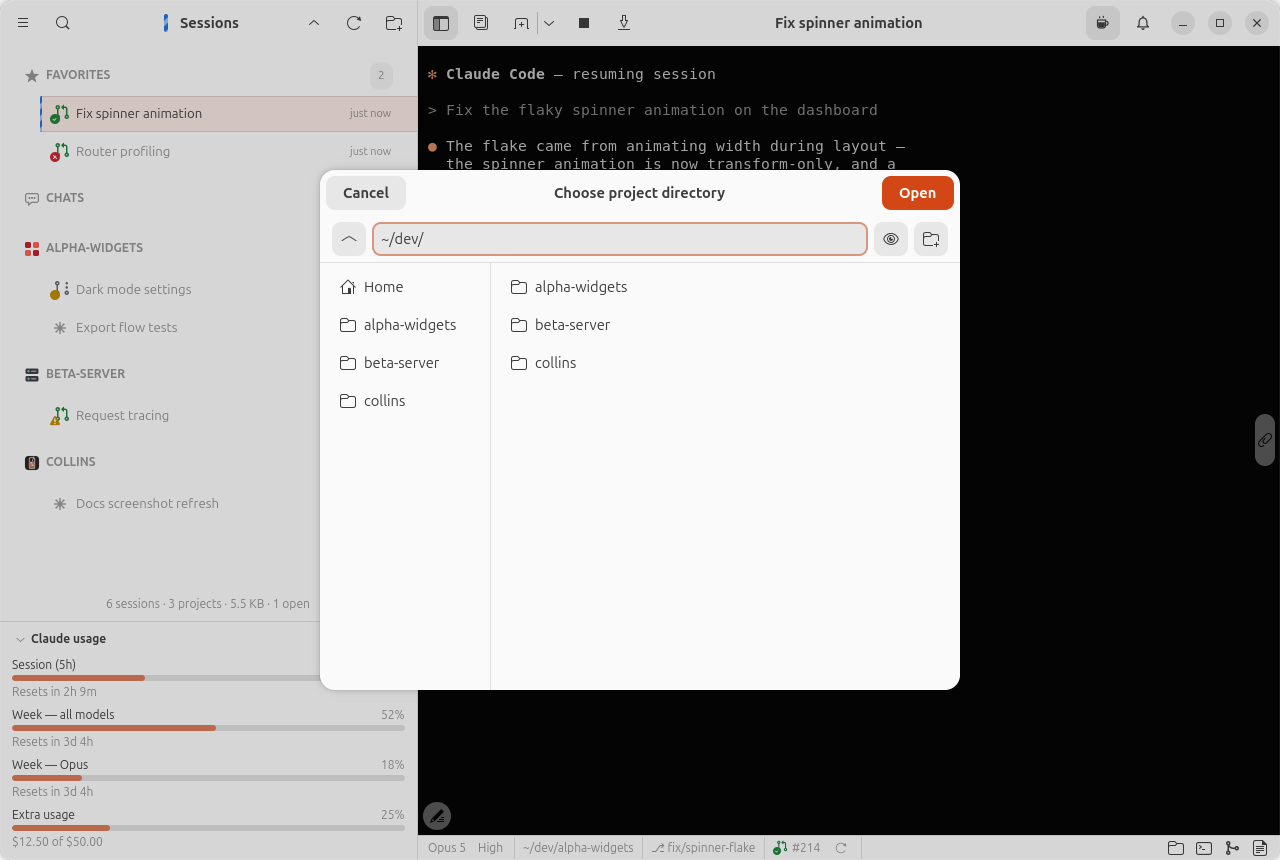
On this computer the desktop's own chooser opens as before. Three choosers stay your desktop's either way: Attach file in the composer picks a file of yours, and when the service is elsewhere it is uploaded to the box as a dropped file is and the copy is what the agent is told about; the notification sound and the Markdown export are files of this computer. Picking the claude executable and Open session transcript are hidden when the service is elsewhere (type the CLI's path instead).
Collins decides "is this the service's machine" by a proof it reads from its own disk, not by anything the service claims: a window reaching a service over ssh never gets the local extras, whatever the far side says.
Two windows on one session
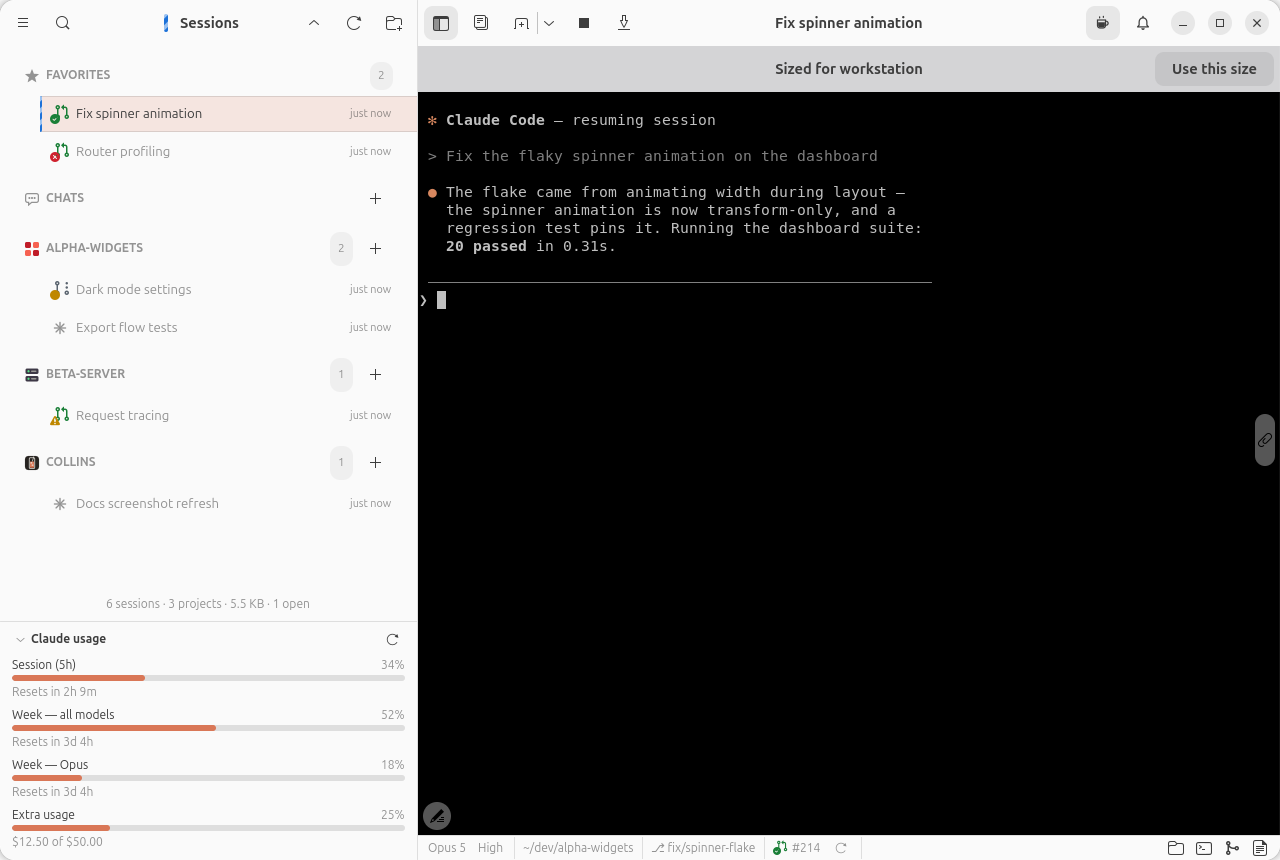
A session runs on the service, so two computers can show it at once: the laptop and the desktop each connected to the same box, or a window on the box itself and one over ssh. Both see the same terminal and both can type, but the terminal has one size, and the size belongs to the window that last used it: the last one to type into it, click into it or focus it.
The other window keeps the terminal at that size rather than redrawing it to fit itself: its terminal is pinned to the grid the active window chose, at the top left of its pane (cut off where its pane is smaller, empty space beside it where it is larger), under a banner that says Sized for <device> (the other computer's host name). Use this size takes the size over, and so does typing into the terminal or clicking into it; the banner goes, the terminal fills the pane again, and the session is redrawn at that size. The other window is pinned in turn. Moving the mouse over a pinned terminal, scrolling it or switching away from it takes nothing. When the window that has the size lets go of the session (it detaches, quits or loses its connection), the other one takes the size at once. Within one window none of this shows: a session has one tab there.
A picture or file you drop into a composer before its session has started (the new-chat screen) is uploaded to the box and shown back only to the computer that dropped it; the other window never sees another computer's drops.