What is Collins?
Collins is a native Linux desktop app that gives your Claude Code sessions a proper home.
As for the name — straight from the README:
My wife keeps referring to Claude as Collins by mistake. So now when she asks me if I'm talking to Collins, I can say yes.
Collins is a fork of agent-session-manager by Máté Molnár — see the original project's website for the app it grew out of. All credit for the original goes there; the fork is GPL-3.0 like the original.
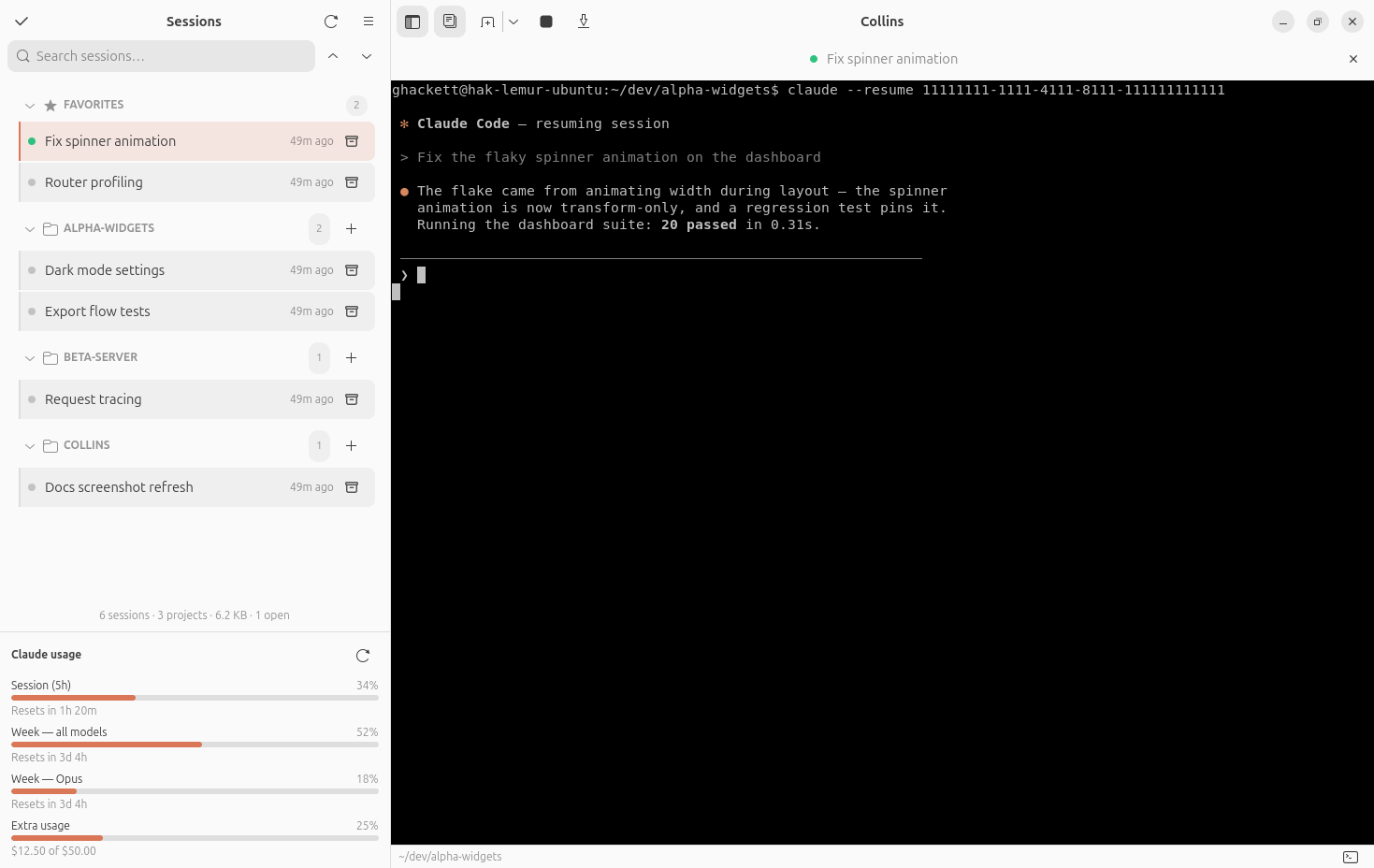
If you use a coding agent daily, you accumulate dozens of sessions scattered across every project you touch. They live as JSONL transcripts named by UUID (Claude Code, for instance, stores them under ~/.claude/projects/) — there's no overview, no way to name them, and no quick way to tell which one was which. The agent's own --resume only shows a picker for the current directory.
This app fixes that. It scans every session on your machine, presents them in a searchable sidebar grouped by project, auto-generates a short title for each one, lets you name and star the ones that matter, and opens any of them in an embedded terminal tab that resumes it right where it last worked — re-attaching to sessions that are still running in the background.
Unofficial community tool
Collins is an independent community project, not affiliated with or endorsed by any agent vendor (including Anthropic). It is strictly read-only with respect to your agents' data — names, favorites, and all app state live in ~/.config/collins/ (caches in ~/.cache/collins/, panel scrollback in ~/.local/state/collins/). Your transcripts are never modified.
Why use it?
- One place for everything. Every session, every project — sessions newest first, projects in your own order (drag a project header to rearrange) — instead of UUID-named files and per-directory pickers.
- Human-readable. Every session gets an auto-generated title; rename
a3b2152e…to “JWT auth” yourself, star your daily drivers, add an emoji to a tab. - Work in parallel. Open several sessions as tabs, each with its own shell panel, code editor, and prompt composer. Sidebar guide lines show what each one is doing, a session can raise a notification when it wants you back — a card in the window, or on the desktop when you're away — a bell in the header counts what's waiting and keeps the history — and you can close the window entirely and let the sessions keep running behind a status icon that shows the same number.
- Write prompts like a person, and park them. A multi-line, spell-checked composer opens the moment you start typing at an agent's prompt, takes pasted images — and keeps whatever you haven't sent. Close the tab, quit Collins, come back tomorrow: the draft is waiting in that session's composer, or under a Draft row in the sidebar for a session you haven't started yet. The bare CLI drops an unsent prompt the moment it exits.
- Review the diff where it happens. A git page beside the session, drawn by Collins itself, shows what the agent has changed — the working tree, the index, any commit of the branch's stack — with staging by file, hunk or line, and note cards on the diff. The agent can open the page on a change, read what you are looking at, and leave notes and highlights of its own.
- Follow the work to the PR. Every pull request a session opens is tracked on its row and tab — CI, conflicts, unanswered comments — with the actions attached: read its description and threads as GitHub renders them, merge, ask for a review, or send the failure back to the agent as a prompt.
- Let the session drive the window. Every session gets a small set of tools of Collins' own: it can name itself, open a file, a diff or an image on your screen, notify you when it needs you, attach a pull request to its row, spawn a sibling session, and read or run commands in the terminal panel.
- Stay oriented. Search the sidebar, search a terminal's scrollback, peek at a session's recent messages before resuming it, and keep an eye on your Claude subscription usage under the session list.
How it compares
Coding agents are terminal programs, and you can absolutely keep using them bare. Collins is a layer on top — it doesn't replace the CLI, it launches and organizes it:
Bare --resume | Collins | |
|---|---|---|
| See all sessions across projects | ❌ | ✅ |
| Custom names & favorites | ❌ | ✅ |
| Multiple sessions side by side | Manual terminals | ✅ Tabs |
| "Which session was this?" | Read the UUID | ✅ Preview, details, peek |
| Copy & paste | Ctrl+Shift+C / Ctrl+Shift+V | ✅ Plain Ctrl+C / Ctrl+V |
| Writing a long prompt | The CLI's own line editor, no spell-check | ✅ Multi-line, spell-checked composer |
| A prompt you haven't sent yet | Gone when the CLI exits | ✅ Kept as a draft, per session — or as a sidebar Draft row for a session not started yet |
| Finished-in-the-background alerts | ❌ | ✅ Notifications |
| Pull request status & actions | gh by hand | ✅ On every session's row |
| Reviewing and staging what the agent changed | git diff / git add -p in another terminal | ✅ A native diff beside the session, staging by file, hunk or line |
| The agent showing you something | It pastes a path | ✅ It opens the file, diff or image on your screen, and can annotate the diff |
What's next?
Head to Getting Started to install it, or browse the full Features.